
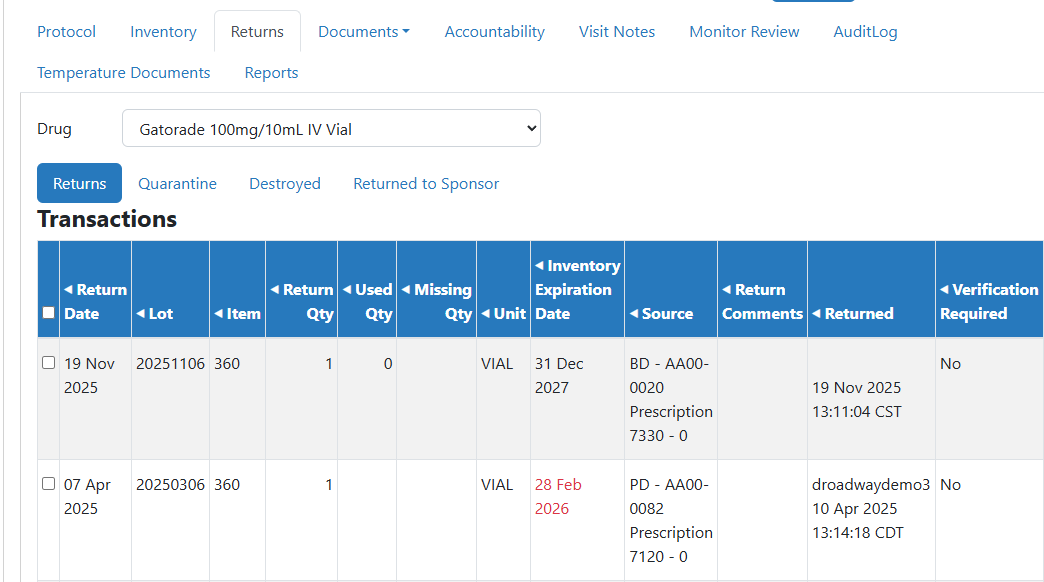
The term Returns includes inventory in the dispositions of quarantined, or participant returns. It also includes inventory that has already been destroyed or returned to sponsor.
- Returns - Inventory that was received back from a participant dispense and recorded, but no final disposition.
- Quarantine - Inventory that was adjusted out of active inventory for any reason, but no final disposition.
- Destroyed - Inventory that has already been destroyed by the site. This can include Quarantined and Participant Return items.
- Returned to Sponsor - Inventory that has already been Returned to the Sponsor by the site. This can include Quarantined and Participant Return items.
Inventory in the Destroyed and Returned to Sponsor disposition are considered Final Dispositions.
- On the Vestigo Verify Homepage - My Visits Tab, click on View Protocols for an active visit
- Locate the protocol to review and click on View Protocol
- Depending on how the site setup the visit, Verify users may have multiple protocols on one visit.
- Click on the Returns tab
- Select a Drug from the drop down menu
- Select the correct Disposition tab
Tip - There are also two reports available to run for inventory in returns.
If you are wanting to Authorize a Destruction or Return to Sponsor, please check out this article. Authorizing happens before a final disposition is recorded by the IDS pharmacy.
If you are wanting to Cosign a Destruction or Return to Sponsor, please check out this article. Cosigning happens after a final disposition is recorded by the IDS pharmacy.