
Note - Requesting a site visit is only available if the site has added open availability for monitors to the calendar.
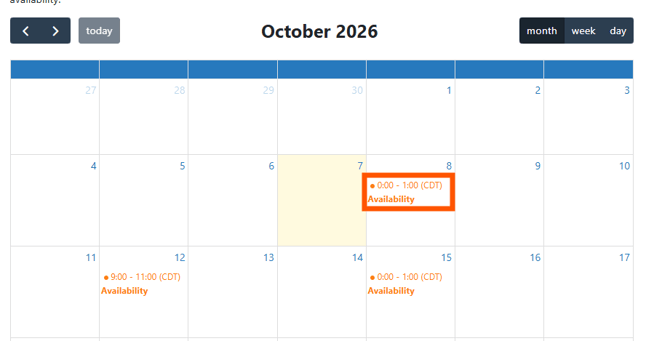
When “Request a Visit” is selected, a calendar will display below. If availability is set up, the monitor will see day(s) and time noted with “Availability”. Select the timeslot and enter details.
If “Availability” is not displayed, the Vestigo client is not using the availability feature or all of the available “slots” are taken. The monitor can use Contact a Site: Request Availability and provide the date and time they are requesting.
-
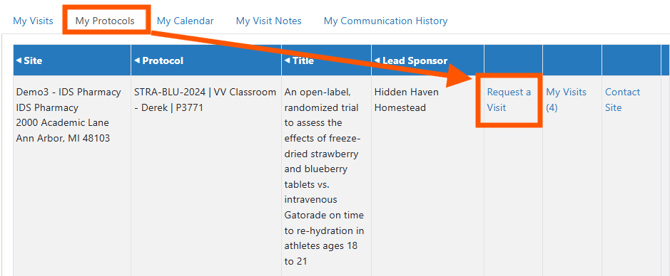
On the My Protocols tab
-
Locate the Protocol for the visit
-
Select the Request a Visit link
-
A calendar will display. Select an appointment time.
- Select the Visit Purpose and Visit Type
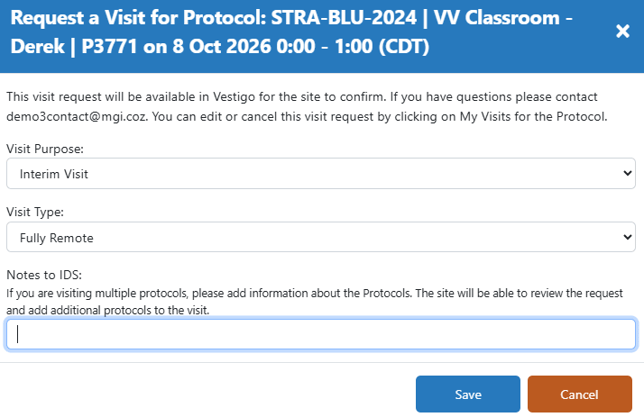
- Enter any additional notes to be included in the request
- Click the Save button
The pharmacy will review the request and respond. The monitor will receive an automated email about the visit and access via the McCreadie Group. The pharmacy may also directly contact the monitor.